Monday, November 4, 2013

EXT4 err: couldn't mount because of unsupported optional features

Backward & Forwards compatibility is great! Until it bites you.

The extN branch of filesystem is the pretty much the standard on your average GNU/Linux installation. Migrations tend to work well if N is increasing i.e. from ext2->ext3->ext4. However, things are not so rosy if you want to mount your ext4 disk on your old PC.
Ext4 which made it into mainline in 2.6.27 introduces new features such as extents that are incompatible and unknown by older kernels. Attempting to mount an incompatible extN fs on your old kernel will fail and err out with logs similar to:

EXT3-fs: sda1: couldn't mount because of unsupported optional features (240).

EXT2-fs: sda1: couldn't mount because of unsupported optional features (240).

Kernel panic - not syncing: VFS: Unable to mount root fs on unknown-block(8,1)
The kernel here attempts to probe and mount the using the most recent extN. If that fails it tries the next ext filesystem and so on. In this case, this is a 2.6.16 kernel attempting to mount an ext4 fs with new features.


# dumpe2fs /tmp/img.ext4
.....
Filesystem volume name: /
Last mounted on: /mnt/tmp
Filesystem magic number: 0xEF53
Filesystem revision #: 1 (dynamic)
Filesystem features: has_journal ext_attr resize_inode dir_index filetype extent flex_bg sparse_super large_file huge_file uninit_bg dir_nlink extra_isize
Filesystem flags: signed_directory_hash


 The solution in this case is to use a newer kernel that understands ext4 or recompile your kernel to support ext4.

Monday, October 28, 2013

Linux kernel network backdoor

The ksplice blog has a very nice entry on hosting backdoors in hardware.
The quick summary of this backdoor is:
  1. Register a protocol handler for an unused IP protocol number .
  2. Call usermodhelper to execute the payload of the packet (skb->data).
  3. Remote system now executes any command that you send it as root.
Unfortunately, it looks like the code is either out of date and/or buggy. Attempting to modprobe the backdoor module generates the following kernel call trace:

Further investigations reveal that this is due to us calling a sleepy method from an atomic one... call_usermodhelper will eventually call wait_for_common which sleeps.  You do not want to sleep in an ISR routine.

The fix for this is to use a deferrable; we need to stop working in an interrupt context and schedule the non atomic work for future processing.

One possible solution is to use work queues for deferrable work. Here's an example implementation in github using work queues.

And here's an example session:

Friday, October 11, 2013

Linux: The pagecache and the loop back fs

Linux has a mechanism that allows you to create a block device that is backed by a file.  Most commonly, this is used to provide an encrpyted fs. All this is fine and dandy. However, you have to factor in that the Linux OS (And practically any other OS) will want to cache contents for block device in memory.
The reasoning here is. Accessing the contents of a file from a disk will cost you ~5ms. Rather than incur this cost on future reads, the OS caches the contents of the recently used file in a page cache. Future reads or writes to this file will hit the page cache which is orders of magnitude faster than your average disk.
This means that your writes will linger in memory until the your backing file's contents get evicted from the page cache. Using o_direct on files that are hosted within the loop backed fs won't help. You have to force pagecache evictions. The easiest way to do this is a call to fadvise and a sync to force pdflush to write your changes.

Here's an experiment:
I have 3 windows open.:
  • One running blktrace  which shows VFS activity.
  • One that has a oneshot dd.
  • One that has a bunch of shell commands that poke around the loop mounted fs.
The experiment is executed in the following order:
  1. An fadvise and a sync at the beginning to make sure the pagecache is clean and all writes are on the FS.
  2. We also print out a couple of stats from /proc/meminfo.
  3. We issue a dd call with direct I/O (oflag=direct).
  4. Print stats from /proc/meminfo and take a look at the backing file using debugfs.
  5. Show how much of the backing file is cached in the pagecache by using fincore.
  6. Evict the pagecache using the fadvise command from linux-ftools.
  7. Force a sync which wakes up pdflush to write out the dirty buffers.
  8. Run debugfs to take a peek at the backing fs again.
  9. Print out some more stats from meminfo.
Here's the script:
And the output generated:
The interesting bits to note here is that writes to a loop back filesystems in Linux are not guaranteed to be on disk until you evict the pagecache and force a sync.

If you are interested in further digging, here's debug output from:

blktrace:
Debugfs and dumpe2fs:

Thursday, October 10, 2013

Saturday, October 5, 2013

RMySQL on OSX

I ran into an issue installing RMySQL on OSX. I am using a R from brew and MySQL from the Oracle download page. Trying to install RMySQL would throw up this error

Turns out that the right solution is really easy. Set your MySQL home R env var, make sure that libmysqlclient can be found by R, configure the RMySQL package with the proper inc & lib dirs for MySQL

Tests!

Friday, April 5, 2013

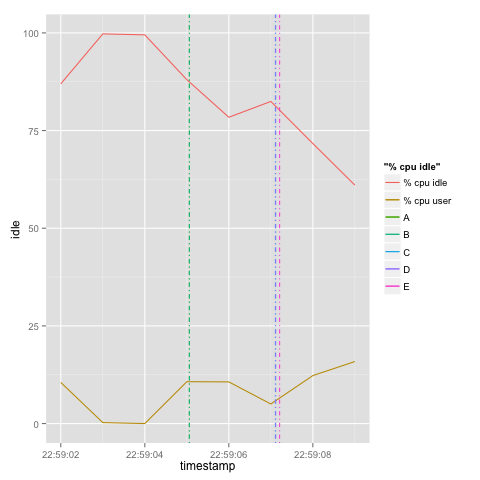
Vertical line markers in R using geom_vline

Say you have a two data sets that share a common dimension/axis only.  Here's an example:

# Event csv
timestamp,event
2013-04-03 22:59:05.061Z,A
2013-04-03 22:59:05.061Z,B
2013-04-03 22:59:07.109Z,C
2013-04-03 22:59:07.115Z,D
2013-04-03 22:59:07.209Z,E

# Performance data
hostname;interval;timestamp;CPU;user;nice;system;iowait;steal;idle
box1;1;2013-04-03 22:59:02 UTC;-1;10.53;0.00;2.01;0.50;0.00;86.97
box1;1;2013-04-03 22:59:03 UTC;-1;0.25;0.00;0.00;0.00;0.00;99.75
box1;1;2013-04-03 22:59:04 UTC;-1;0.00;0.00;0.25;0.25;0.00;99.50
box1;1;2013-04-03 22:59:05 UTC;-1;10.72;0.00;1.00;0.25;0.00;88.03
box1;1;2013-04-03 22:59:06 UTC;-1;10.67;0.00;10.67;0.00;0.25;78.41
box1;1;2013-04-03 22:59:07 UTC;-1;5.01;0.00;9.02;3.51;0.00;82.46
box1;1;2013-04-03 22:59:08 UTC;-1;12.28;0.00;11.53;4.26;0.25;71.68
box1;1;2013-04-03 22:59:09 UTC;-1;15.88;0.00;11.66;10.92;0.50;61.04
You'd like to plot these values on one graph; one overlaid over the other. Based on the data from the example above, you'd like to plot the CPU user against the timestamp metric, then you'd like to add in markers to show events over the chart.

Here's a gist:

 Obviously, we need a better legend, y axis label and a title for this graph.. That's left as an exercise.

Tuesday, April 2, 2013

R and GFS.

Playing with NOAA's GFS data with R.

Credit:

Here are some sample images.


Pre-requisites

  • Fetched data from NOAA (in particular this dataset).
  • Installed wgrib2.
  • Extracted the fields I was interested in from the grib2 file into netcdf
./grib2/wgrib2/wgrib2  -s  gfs.t12z.sfluxgrbf03.grib2  | grep :LAND | ./grib2/wgrib2/wgrib2 -i gfs.t12z.sfluxgrbf03.grib2 -netcdf land.netcdf
./grib2/wgrib2/wgrib2  -s  gfs.t12z.sfluxgrbf03.grib2  | grep TMP:2 | ./grib2/wgrib2/wgrib2 -i gfs.t12z.sfluxgrbf03.grib2 -netcdf temp2.netcdf
./grib2/wgrib2/wgrib2  -s  gfs.t12z.sfluxgrbf03.grib2  | grep VEG: | ./grib2/wgrib2/wgrib2 -i gfs.t12z.sfluxgrbf03.grib2 -netcdf vegetation.netcdf
./grib2/wgrib2/wgrib2  -s  gfs.t12z.sfluxgrbf03.grib2  | grep TCDC: | ./grib2/wgrib2/wgrib2 -i gfs.t12z.sfluxgrbf03.grib2 -netcdf cloud.netcdf

  • You can also view the available fields using:
./grib2/wgrib2/wgrib2  -s  gfs.t12z.sfluxgrbf03.grib2  | less

Having fun

Started R and installed netcdf and fields:
install.packages('ncdf')
install.packages('fields')
Then used the following gist in R.